Feel Supported, Grounded, and Calm
Your personalized AI companion helps you understand yourself and turn
insights into real change.
Connect with Aura



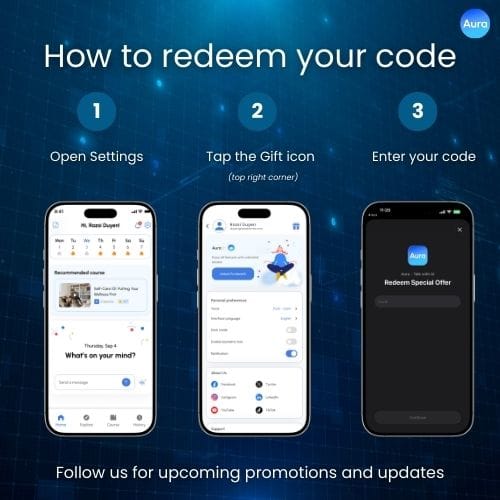
Applying your promo code is quick and simple. Just head to Settings, tap the Gift icon in the top right corner, and enter your code to activate your offer.
It only takes a few seconds to get started — no extra steps, no confusion.
Where to Find It
You can redeem your code directly inside the app:
Go to Settings and look for the Gift icon in the top right corner. This is where you can enter and manage your promo codes.
Everything is designed to be easy to find, so you can access your offer without searching around.
How It Works
Redeeming your code takes just a few taps:
Once applied, your offer will be activated instantly.
When to Use Your Code
You can apply your promo code whenever you receive one:
Each code may have its own conditions, so make sure to use it before it expires.
If Something Doesn’t Work
If your code isn’t working, a few quick checks can help:
If you still have trouble, you can always reach out at support@talkwithaura.com.
Stay Updated - We regularly share new offers and updates.
Follow us to stay up to date — so you don’t miss what’s coming next.